In this guide10 sections
- 01Why does a call center lose calls in waves?
- 02What an AI voice assistant takes on in a contact center: the scenario map
- 03How does a peak-hour call sound with the voice agent?
- 04A day with the AI voice agent inside a busy call center
- 05What does a BPO gain from automation?
- 06Where do the operators stay in charge, and what the agent refuses?
- 07What do you set up before a new project goes live?
- 08How do you put an agent on a project, step by step?
- 09Test an AI voice agent on your own call center workload
- 10How much does an AI voice agent for a call center cost?
An AI voice agent for a call center is an AI voice assistant that takes calls at traffic peaks, answers after hours and runs the repetitive campaigns of confirmations, reminders and surveys. It works like a colleague who takes level one: it identifies the call, notes the request with its reference and hands the hard cases to the operators. In short, AgentVocal AI brings automation to a BPO’s call queue, and a voice assistant available non-stop keeps the line open right when your team is most stretched. That same voice agent scales up for the peak and back down when the wave passes.
Below you will see which calls it takes, how you automate the campaigns, how a real conversation sounds and what stays with the operators. The examples come from your trade: sudden peaks, waiting queues, after-hours overflow and long calling lists.
Why does a call center lose calls in waves?
A call center does not lose calls evenly, it loses them in waves. A campaign, an advert, an outage or simply the rush hour arrives, and suddenly several times more calls come in than the operators can take. The line rings busy, the wait grows, people hang up. Every lost call is a customer or a lead who may not come back.
The second cost is subtler: good operators spend the day on repetitive calls, confirmations and reminders that anyone could make, instead of the hard cases where a person really matters. An AI voice assistant solves both: it absorbs the wave and takes the repetitive part, so the team works where it adds value. This is the quiet promise behind call center automation.
What an AI voice assistant takes on in a contact center: the scenario map
In AgentVocal AI you split the work into incoming calls, which the agent takes, and outbound calls, the campaigns it starts from a list and a brief. Below are all the scenarios you can switch on in the app. See also the page dedicated to call centers and BPO.
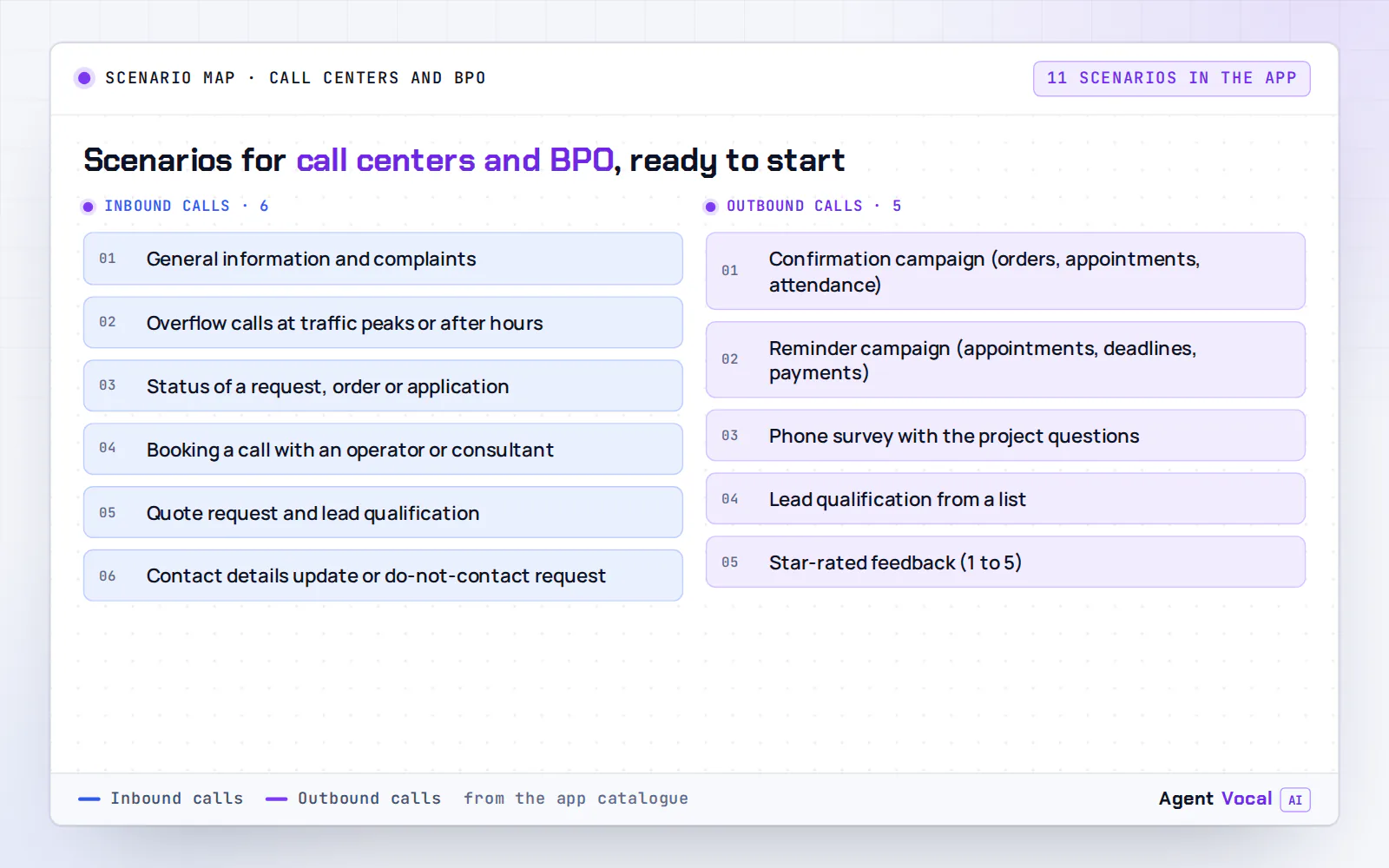
Incoming calls
- General information and complaints: the customer calls with a general question about hours, services or the status of a request, or with a complaint. The agent answers from the knowledge base and logs complaints in full for the team.
- Overflow calls at traffic peaks or after hours: when operators are busy or the team is off duty, the agent takes the call, finds out the reason, notes the full request with its reference and hands it to the team by the project rules. This is where the busy line stops.
- Status of a request, order or application: the customer wants to know how far their order, request or complaint has got. The agent identifies them by reference, says only what the knowledge base knows and notes what a colleague still has to check.
- Booking a call with an operator or consultant: the customer wants to talk to a person about a subject that needs judgement. The agent finds out the subject and the department and books a free slot in the calendar for a call back.
- Quote request and lead qualification: the person calls after an advert, a form or a recommendation and wants a quote. The agent finds out what they need, how they heard about you and when they decide, says only what the knowledge base holds and notes the lead for sales.
- Contact details update or do-not-contact request: the customer changes their phone, email or address, unsubscribes or asks not to be called again. The agent notes the exact request and honours “do not call me again” at once.
Outbound calls
- Confirmation campaign (orders, appointments, attendance): the agent calls the people on the list and confirms what the brief says, an order, an appointment, attendance or an address. The outcome is clear: confirmed, changed, refused or to call back.
- Reminder campaign (appointments, deadlines, payments): the agent reminds the people on the list of an upcoming appointment, deadline or payment and notes the answer: acknowledged, asks to reschedule, already done or disputes it.
- Phone survey with the project questions: the agent asks up to five short questions, exactly those in the brief, and notes the answers in people’s own words. This is the perfect automation for a BPO that runs repeated surveys.
- Lead qualification from a list: the agent calls people who left their details through a form, at an event or in a campaign, checks that the interest is real, finds out the need and the next step and notes the lead for sales.
- Star-rated feedback (1 to 5): after the last interaction with the team, the agent asks seven short questions, each rated from one to five stars, and notes the comments, so you have a steady measure of quality.
How does a peak-hour call sound with the voice agent?
Here is an incoming call at a fictional call center, LineBridge, in the middle of a traffic peak.
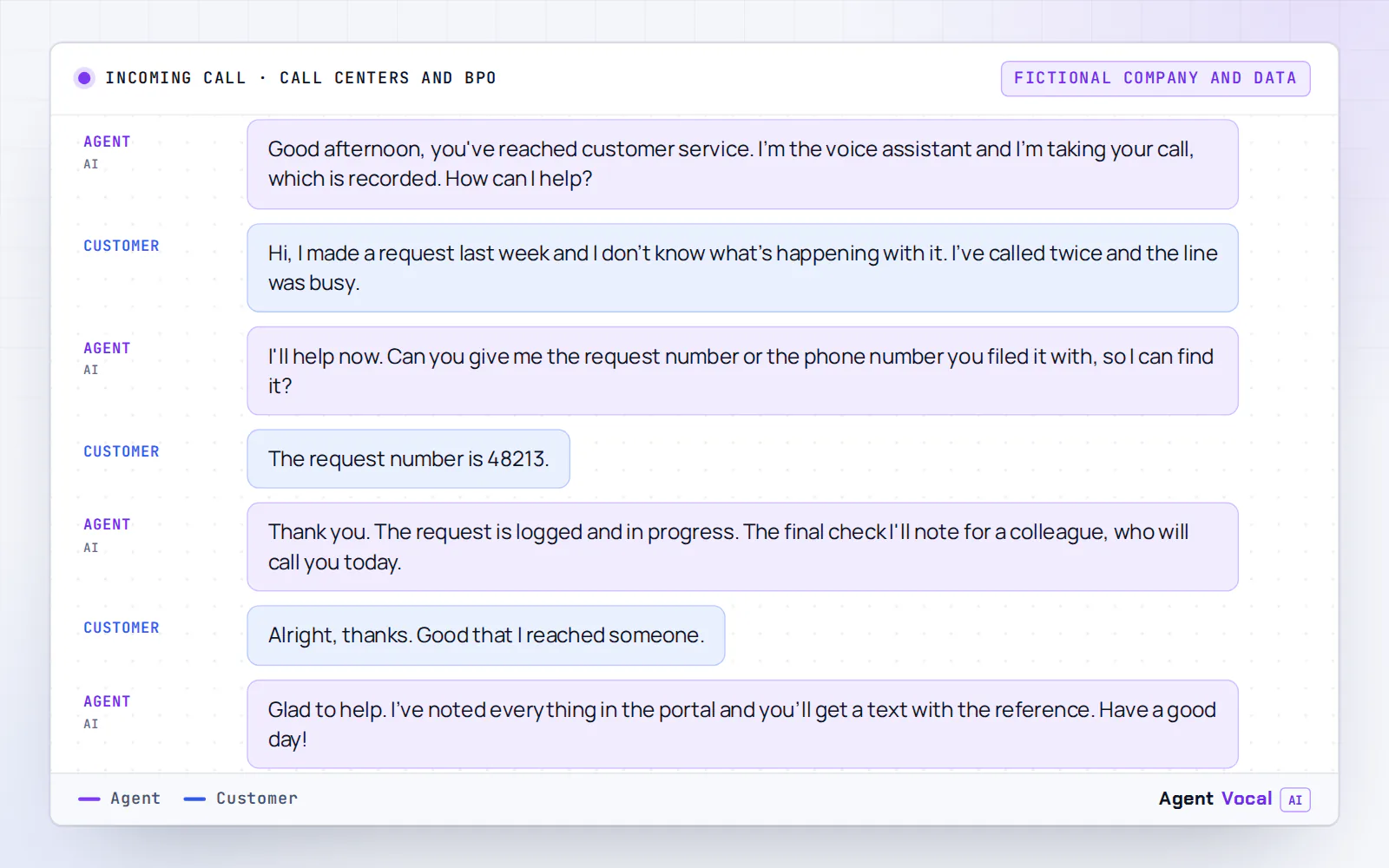
Notice what the AI voice assistant did: it introduced itself as a virtual assistant and announced the recording; it identified the request by its number instead of passing the person around; it said only what the knowledge base knows for sure; it noted the part that needs a check for an operator and sent the reference by SMS. Nothing was lost in the queue, and the operator picks up the case with full context, not from scratch. If you want to hear the tone, listen to a demo.
A day with the AI voice agent inside a busy call center
For an AI voice agent put on a call center project, the day runs on two threads: the campaigns it starts and the calls it takes.
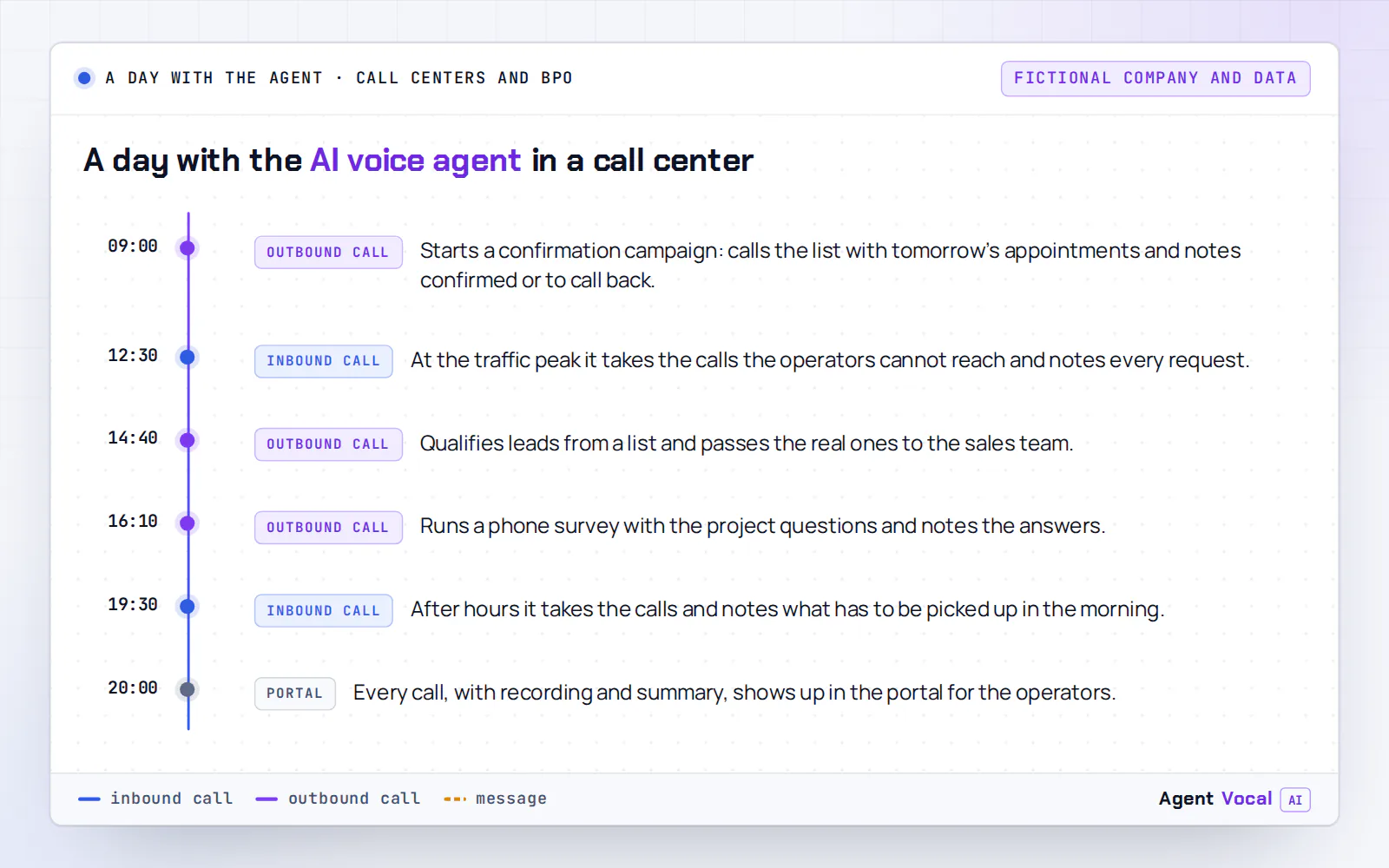
In the morning it ran a confirmation campaign for the next day’s appointments, so operators no longer had to dial one by one. At midday, during the traffic peak, it took the calls the team could not reach and noted each request with its reference. In the afternoon it qualified a list of leads and passed only the real contacts to sales, then ran a phone survey. In the evening, after hours, it kept the line open and noted what had to be picked up in the morning. The operators started the next day with a clean list, not a mountain of missed calls.
What does a BPO gain from automation?
The gain comes from the mechanism, not from promises:
- You absorb the peaks: the agent takes any number of calls at once, so the line no longer rings busy in the rush hour.
- Operators on hard cases: automating the repetitive campaigns frees people for the calls that need judgement and empathy.
- Mass campaigns without fatigue: confirmations, reminders and surveys on long lists, with a clear outcome for every call.
- Clean reporting for clients: every call enters the AgentVocal AI portal with recording, transcript and summary, in the same format, plus messages by WhatsApp, SMS or email, so the data you pass on to the client is comparable, not notes written differently each time.
- Clients in several countries: the 84 languages available help a BPO that serves different markets, without recruiting speakers for each one.
- No waiting time: the agent picks up in less than a second and gives the same information on the first call and on the five hundredth.
A good call center is not measured by how many calls it dialled, but by how many hard cases reached rested people. Automating level one is exactly what makes room for that.
There is one more gain that is easy to miss: when volume spikes overnight you do not scramble to recruit and train, you raise the agent’s capacity and lower it again when the wave passes, while every call is still logged in the same format for your client reports.
Where do the operators stay in charge, and what the agent refuses?
An honest voice assistant says clearly where it stops:
- It does not make decisions that need judgement: it escalates the case and notes the context for an operator.
- It does not negotiate and does not promise results it cannot guarantee.
- It does not improvise answers: if the knowledge base does not know, it notes and hands over.
- It does not force a “yes”: it honours “do not call me again”, the time ranges and the project rules. See how we treat data on the security page.
- It does not pretend to be human: it introduces itself as a virtual assistant and announces the recording.
Angry customers, delicate complaints and commercial decisions stay with the operators. The AI voice agent makes their work easier, it does not take their place.
What do you set up before a new project goes live?
A good AI voice assistant starts from a good brief. In AgentVocal AI you prepare:
- the knowledge base: the answers to the project’s common questions and the rules for handing cases to operators;
- the brief for each campaign: what the agent confirms, reminds or asks and what outcome it notes;
- the contact lists for outbound calls, clean and with consent in order;
- the connections: CRM, calendar and message channels, which you link from integrations;
- the time ranges and the retry cadence.
For outbound campaigns, read the automated outbound call campaigns guide too, and the logic of measuring is in the phone surveys and feedback scenario.
How do you put an agent on a project, step by step?
You put the agent on a project without waiting for a long integration: you configure your account yourself, and we only approve it, within 24 hours at most. If you first want the big picture, see how an AI voice agent works.
- You register in AgentVocal AI through the form with the cost estimate.
- You go through the nine-step wizard: company, industry and scenarios, modules, price, connections, agent and voice, a phone number assigned automatically, lists and schedule, test call. In a real test, the technical configuration took 4 minutes and 38 seconds.
- You start with a single flow, for example the peak overflow or a confirmation campaign.
- You make a test call from your own phone.
- You expand to the whole project as you see the results.
What a call center backed by an AI voice agent looks like in practice is in the AI call center guide.
Test an AI voice agent on your own call center workload
You do not have to take our word for it: create an account and try it on a real project. You create an account in a few minutes at Create your account, see the estimated cost in the form, choose the call center and BPO industry and tick your own flows, from taking calls at the peak to confirmation and survey campaigns.
Once the account is approved, you get the nine-step wizard and configure the agent yourself. Then you make the first test call from your own phone: call in as a customer at a traffic peak, start a small confirmation campaign on a test list and check what reaches the portal, before the agent calls a single real customer. See how an AI voice assistant works alongside your operators, with no promises and no commitment.
How much does an AI voice agent for a call center cost?
You pay per minute of conversation, rounded up per call, plus a one-time setup per channel. The only calls that are not charged are the ones nobody answers; voicemail is billed as a normal minute. For a BPO, that means you pay for the capacity you use at the peak, not operators sitting idle between waves. The higher the monthly volume, the lower the minute, and paying per conversation means you do not fund dead time between campaigns. The full model, with the volume thresholds, is on the pricing page.