AI voice agents for businesses in Romania and the EU

AI voice agent: no missed calls. No customer left waiting.

AI voice agents that make and answer phone calls for your business, in Romanian and 83 more languages. They confirm orders, chase documents, book appointments and write everything into your systems.

  • LINESopen right now
  • REPLYunder 1 second
  • APPROVALwithin 24 h
LINE 01 OUTBOUND ENDED

Cash on delivery confirmation

CUSTOMER · ONLINE SHOP

01:12
AGENT

Good afternoon! I am the shop's virtual assistant, calling about the order you placed today. This call is recorded.

CALLER

Yes, hello. Go ahead.

AGENT

You pay on delivery. The address is 12 Teilor Street, Brașov. Is that right?

CALLER

The street is right, but I forgot: block B, flat 14.

AGENT

Noted. I am sending you the confirmation on WhatsApp now.

Order confirmed

Note written in ERPAddress correctedWhatsApp sent

  • 01CLIENTS

    80+

    companies already have agents on the phone.

  • 02LANGUAGES

    84

    languages, with Romanian first.

  • 03SCENARIOS

    300+

    call scenarios, ready to switch on.

  • 04HOURS

    24/7

    Nights, weekends and holidays.

  • 05REPLY

    <1 s

    Under one second, mid-conversation.

  • 06SETUP

    9

    steps from account to test call.

What happens today

The phone rings. And rings. And nobody has time.

Every business that deals with people knows the scene: unconfirmed orders that come back, forgotten appointments, files stuck because a single document is missing, customers who call in the evening and nobody picks up. Meanwhile your team repeats the same sentence dozens of times a day instead of doing the work you hired them for.

Call logtodayUNRESOLVED 6/6
TimeCallStatus
08:12
07xx xxx 214 cash-on-delivery order
Unconfirmed
09:47
07xx xxx 590 incoming call
Missed
11:30
07xx xxx 077 case file, missing ID
Pending
13:15
07xx xxx 861 incoming call
Busy
16:52
07xx xxx 342 parcel
Returned
19:40
07xx xxx 455 after hours
Missed

Nobody called back.

  1. 16:52 · Returned

    The parcel that comes back.

    Nobody called the customer to confirm. You pay for shipping twice and lose the sale too.

  2. 19:40 · Missed

    The after-hours call.

    The customer called at 7:40 pm. The next morning they called your competitor.

  3. 11:30 · Pending

    The file that goes nowhere.

    A copy of an ID is missing. Nobody had time to call the person.

It is not a lack of good people. It is a lack of hours in the day.

How it works

From sign-up form to first call, without touching a cable.

You tell us what the agent should do, a person on our team approves it, and the setup guides you step by step. You hear it talk before it ever calls a customer.

  1. 01FORM

    Fill in the form

    Describe the calls you want the agent to handle and see the estimated cost right away, before you submit anything.

    INSTANT ESTIMATE

  2. 02APPROVAL

    A person approves

    Someone on our team reviews your request and approves it. You never wait more than a day.

    WITHIN 24 H

  3. 03SETUP

    Set up in 9 steps

    Voice, script, hours, integrations. In our own test, the technical side took 4 minutes and 38 seconds.

    9 / 9

  4. 04TEST

    Make the test call

    Hear the agent on your own phone, adjust what you like, and only then let it talk to your customers.

    READY TO GO

See the whole process, step by step

Listen to a call

We won’t tell you how it sounds. Listen.

Three calls, start to finish, with the transcript lighting up line by line and the outcome you receive. The calls are in Romanian.

Order confirmation

Order #10482 · online shop (fictional) · cash on delivery

00:00 / 01:33
OUTCOME
Confirmed
DETAILS
Address corrected: block B, flat 14Delivery note: after 16:00
ACTIONS
Note written in ERPConfirmation SMS sent

Companies and people in these calls are fictional. The voices are the agent’s. Sound starts only when you press play.

All demo calls, explained

Scenarios

Six lines. Each with its own job.

The agent does more than talk: it sees the call through and leaves a trace in your systems. Here is what it actually does on each line.

  • L-02OUTBOUNDRETRY THURSDAY

    Documents for case files

    Explains exactly what is missing from the file, then sends the list on WhatsApp and email. Calls back if nothing arrives.

    OUTCOME Note in CRM

  • L-03INBOUNDON CALL

    Information and bookings

    Checks the calendar, offers 2-3 free slots, creates the booking and sends the confirmation on the spot.

    OUTCOME Booking in calendar

  • L-04INBOUNDLINE OPEN

    Inbound calls 24/7

    Answers at night, at weekends or when you are busy, from your knowledge base: documents, website, rules.

    OUTCOME Summary in portal

  • L-05OUTBOUNDIN TIME WINDOW

    Surveys and feedback

    Calls after delivery or after a visit, asks your questions in your order and records the answers word for word.

    OUTCOME Answers in report

  • L-06AFTER CALLQUEUED

    Follow-up on WhatsApp, SMS, email

    Puts in writing what was agreed on the phone: confirmations, document lists, addresses, map links.

    OUTCOME Message delivered

  • Automatic retriesAt the times you set, not at random.

  • Time windowsCalls only within the hours you choose.

  • No double callsNobody is called twice for the same case.

  • “Don’t call me” respectedThe number leaves the list the first time.

See all scenarios

A day in the life of the agent

Its working day does not end at 5 pm.

In the morning it confirms orders, at noon it books appointments, in the evening it answers when reception is closed. The same voice, just as patient on the last call as on the first.

THE AGENT LINE · ONE DAYOPEN 24/7now 12:00· BUCHAREST TIME
  1. Inbound

    A call in the middle of the night

    Someone calls while everyone is asleep. The agent answers, takes down the request, and you find it in the portal in the morning.

  2. Outbound

    Order confirmations

    It calls cash-on-delivery customers: address, items, amount. The outcome lands in your ERP on its own.

  3. Call + messages

    Documents for claims

    It explains what is missing, then sends the list on WhatsApp and by email. The note stays in your CRM.

  4. Calendar

    Appointments

    It offers two or three free slots from the calendar, starting tomorrow, and sends the confirmation.

  5. Cadence

    Retries

    Whoever missed the morning call is called again, on the cadence you set. Whoever asked not to be called, is not.

  6. Follow-up

    After-call messages

    SMS, WhatsApp or email with exactly what was agreed, so nobody has to remember anything.

  7. Inbound

    A call after hours

    Reception has closed. The agent has not: it answers, books, and writes everything down.

  8. 24/7

    Still answering

    Outbound calls stopped at the hour you chose. Inbound calls kept being answered, 24/7.

03:12 · incoming call

It is night. Someone calls.
And someone answers.

  • NO BREAKSIt answers at any hour, at weekends and when all your lines are busy.
  • NOTHING FORGOTTENEvery call has a recording, transcript, summary and outcome, in your portal.
  • NO PESTERINGIt retries only at the times you set and respects “don’t call me” the first time.

Languages

84 languages. Every customer is called in their own.

Your agent speaks Romanian like one of the family, and just as naturally with your customers across Europe and beyond: 84 languages spoken. You set each contact’s language in your list.

MULTILINGUAL LINE84 · ACTIVE
Used today in real calls11 LANGUAGES
  • ro Română „Bună ziua”
  • en English „Hello”
  • es Español „Hola”
  • it Italiano „Buongiorno”
  • fr Français „Bonjour”
  • de Deutsch „Guten Tag”
  • hu Magyar „Jó napot”
  • pl Polski „Dzień dobry”
  • nl Nederlands „Goedendag”
  • el Ελληνικά „Καλημέρα”
  • no Norsk „God dag”
  • +73 and 73 more at setup

Each additional language for your agent is set up separately (see Pricing).

Works with what you have

Nothing changes in how you work. It adapts.

The agent reads and writes where your team already works. Nobody copies by hand what was said on the phone any more.

YOUR AGENTreads before the call, writes after8 PORTS

ON CALL

Your agent

reads before the call, writes after

← readssends →

  • reads and writes

    Your CRM

    Zoho and other CRMs, for example, via API: notes, statuses, call history.

  • reads and writes

    Your ERP

    Confirmations, address corrections, outcomes.

  • reads and writes

    Calendar

    Free slots and bookings.

  • reads

    Knowledge base

    Your documents and website, so the agent answers correctly.

  • sends

    WhatsApp

    Automatic message after the call, from your own WhatsApp Business account.

  • sends

    Email

    Sent from your address, through your own mail server.

  • sends

    SMS

    Confirmations and reminders.

  • open port

    Another system?

    Write to us and we will check together whether we can connect it via API.

    Write to us

What you see in the portal

Every call leaves a complete record.

Recording, transcript, summary and outcome, all in one place. Plus your campaigns, lists, reports and invoices.

CALL · ORDER CONFIRMATION02.10 · 10:42DURATION 01:16 COMPLETED

01RECORDINGMP3

Listen to the call any time, from any line.

02TRANSCRIPTRO

  • AThe address is 12 Teilor Street, Brașov. Correct?
  • CThe street is right, but I forgot: block B, flat 14.
  • ANoted. Anything else to change?

Word for word, with who said what.

03SUMMARYAUTO

The customer confirms the order. The address was completed with block and flat. Asks for delivery after 4 pm.

Three lines instead of a minute of listening.

04OUTCOMEERP

ConfirmedNote written in ERPSMS sent

What was decided, written where you work.

  • CampaignsWho calls, from which list, when.
  • ListsUpload contacts, the agent works through them.
  • ReportsOutcomes per day, campaign and scenario.
  • InvoicesAll of them, downloadable, in one account.
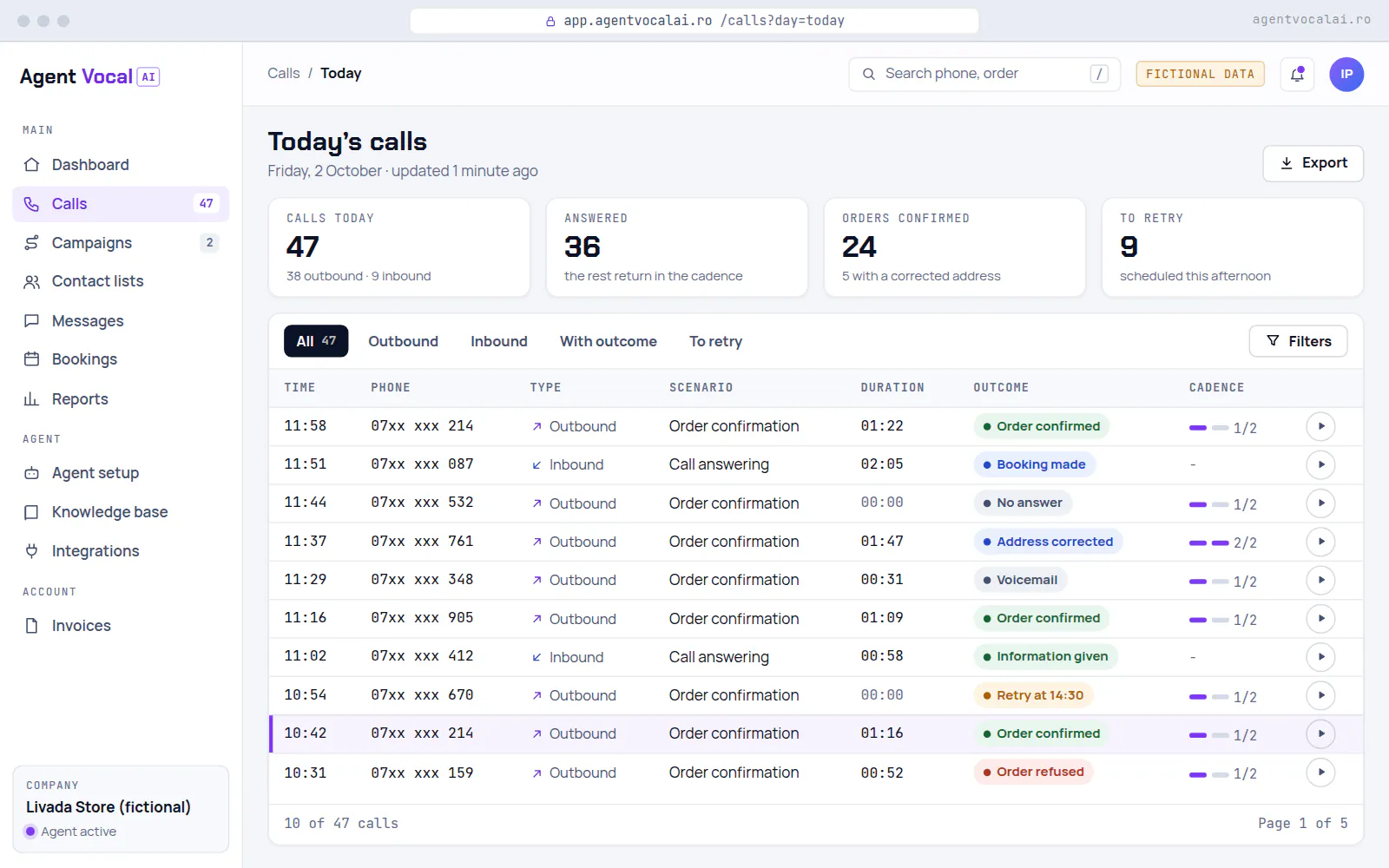
The list of today’s calls in the portal: a table with time, masked phone number, call type (outbound or inbound), scenario, duration, colour-coded outcome and the retry cadence step.
Today’s calls: time, masked phone, scenario, duration, outcome and cadence. Illustrative interface, fictional data.
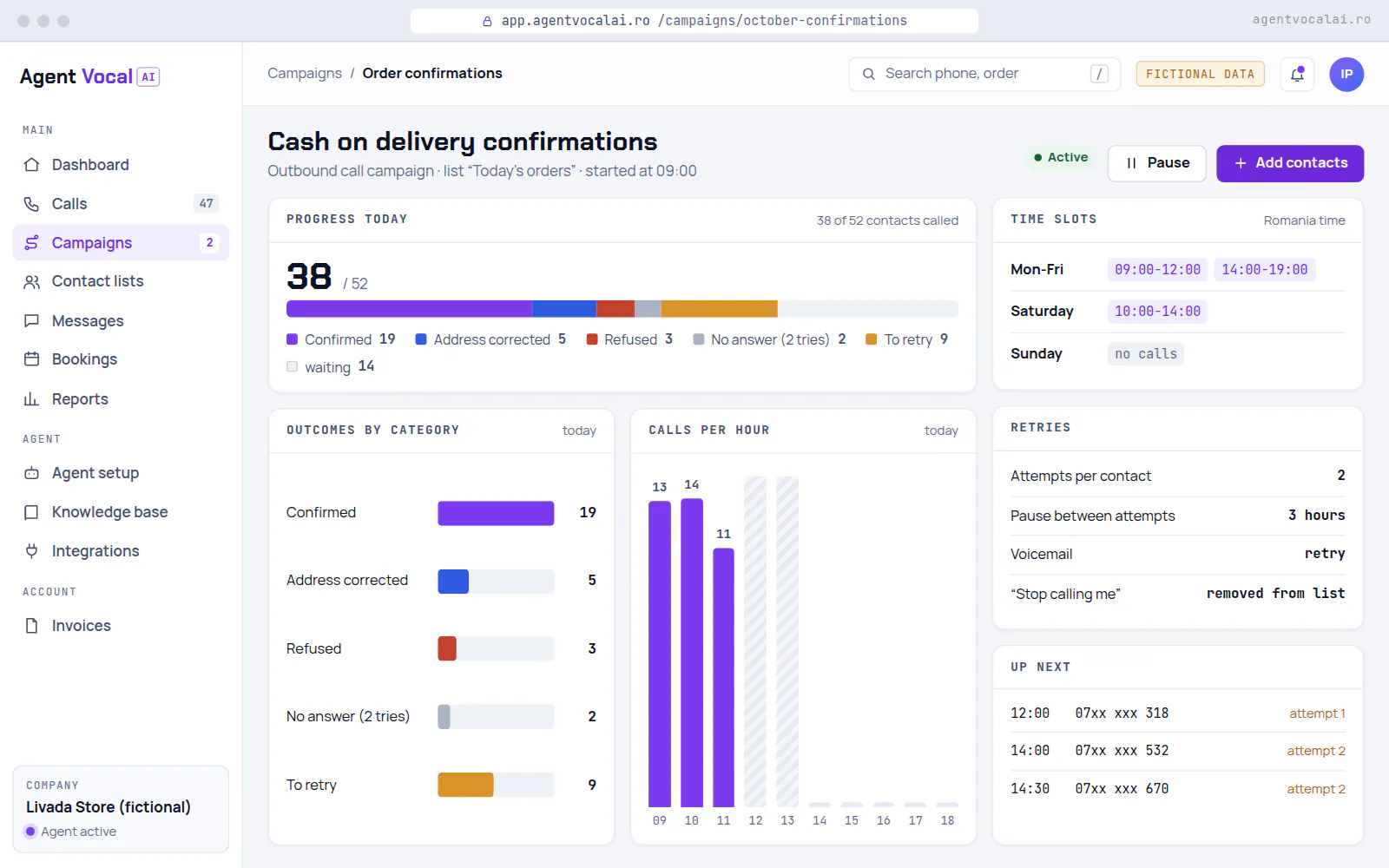
An outbound call campaign page: today’s progress, outcomes by category in a bar chart, calls per hour, time slots, retry rules and the next scheduled calls.
An outbound call campaign: progress, time slots, retries and outcomes by category. Illustrative interface, fictional data.
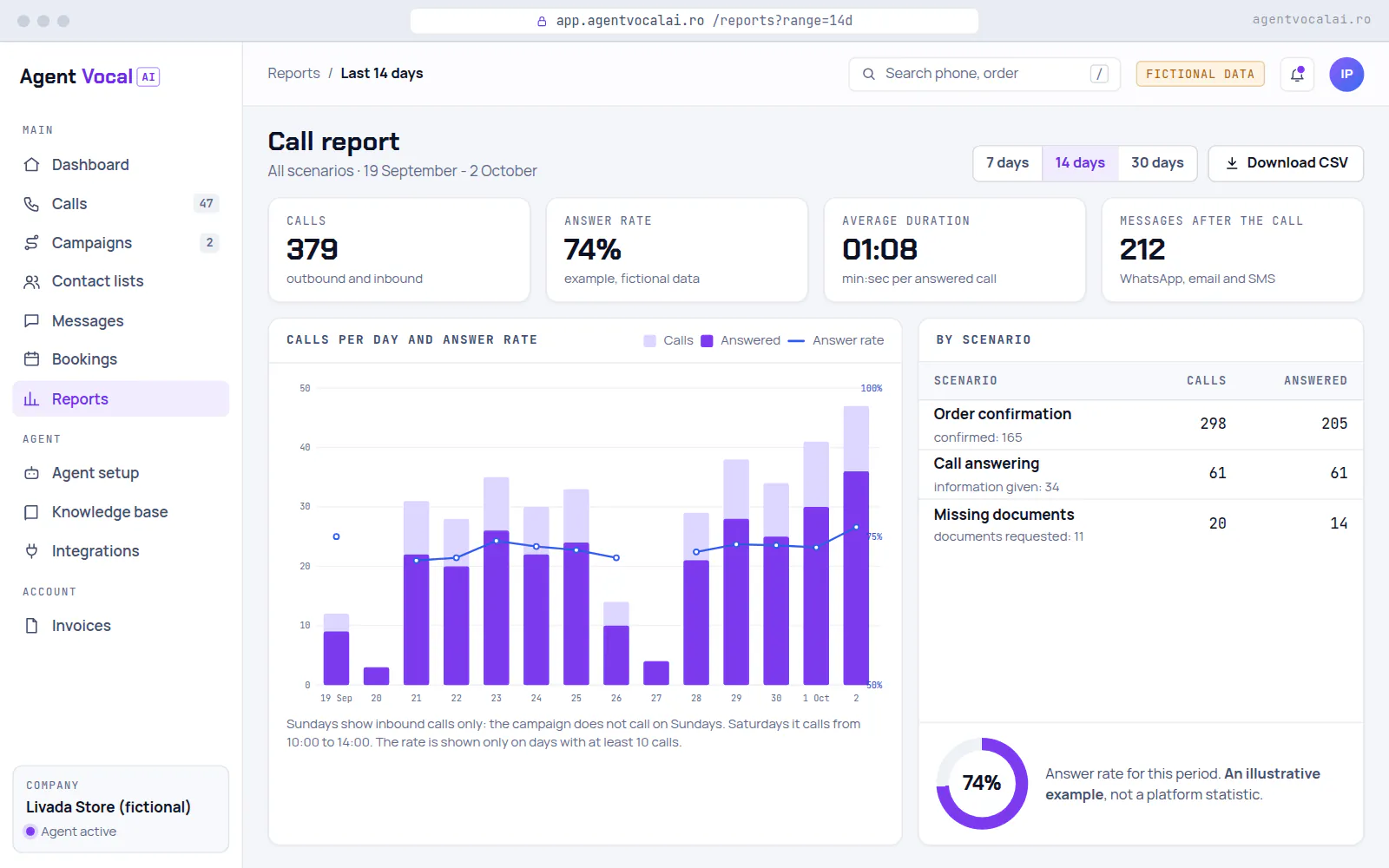
A 14-day call report: a chart of calls per day with the answer rate, the headline numbers and a breakdown by scenario, all with fictional data.
The 14-day report: calls per day and an answer rate shown as an example. Illustrative interface, fictional data.

See everything in the portal

Security

It speaks for your business. So it plays by your rules.

We won’t show you badges we don’t have. Instead, here is what the platform does today, line by line. The same measures are written into the data processing agreement you sign.

THE ROUTE OF AN OUTBOUND CALL4 FILTERS
  1. Call in queuefrom your list
  2. Do-not-call listchecked before every call
  3. Calling hoursonly at the hours you choose
  4. No double callssame person, same case: once
  5. Honest introductionvirtual assistant, call recorded
  6. The person calledonly if it passes everything
REGISTER OF SAFEGUARDS11 IN FORCE
  1. 01Your data

    Hosted in Romania.

    Calls, recordings and transcripts are stored on servers in Romania.

    in force

  2. 02Your data

    Every company in its own space.

    Each call, list and campaign belongs to a single client. Recordings have no public links: they can only be played from your account.

    in force

  3. 03Your data

    Recording is your call.

    You decide whether calls are recorded and what goes into your lists. You see everything: each call has a recording, transcript and summary in the portal.

    in force

  4. 04Your data

    Encrypted connections.

    Everything runs over HTTPS. Credentials for your own systems (email, SMS, telephony) are stored encrypted.

    in force

  5. 05Account access

    Passwords nobody can read.

    Passwords are kept only as hashes, and repeated guessing attempts are blocked.

    in force

  6. 06Account access

    Two-step verification.

    A one-time code by SMS, available for admin accounts and, on request, for everyone on your team.

    in force

  7. 07Account access

    Audit log.

    Sign-ins, changes made in the portal and access to recordings are logged. When our team steps in for support, it shows up separately in the log.

    in force

  8. 08The people you call

    It introduces itself honestly.

    The person called is told the call is recorded. The agent can say up front that it is your company’s virtual assistant. That is what we recommend.

    in force

  9. 09The people you call

    “Don’t call me again” really means no.

    The do-not-call list is checked before every call, SMS or WhatsApp message.

    in force

  10. 10The people you call

    Calling hours.

    Nobody gets a call at 7 a.m. or on a Sunday evening, unless you want it that way.

    in force

  11. 11The people you call

    No double calls.

    The system avoids calling the same person twice about the same case.

    in force

  12. 12No badges

    We don’t claim security certifications. We would rather show you exactly what we do.

Clear roles, in writing

For your customers’ data (calls, recordings, transcripts, contact lists) we act as your processor, under the data processing agreement (DPA) you sign when you register. The data stays yours.

AgentVocal AI is a brand of White Hat Technology S.R.L., VAT ID RO44549761. Questions about data: contact@agentvocalai.ro · Supervisory authority: ANSPDCP (Romania)

Set it up yourself

From “let’s give it a try” to your first test call, in minutes.

No sales meetings, no quote that turns up a week later. Sign up, see your estimated cost right in the form, and once you’re approved a 9-step guide takes you all the way to a test call.

GUIDED SETUP09 / 09

BEFORE THE GUIDE

00Sign-upestimated cost shown in the form

Approvaldone by a person, within 24 hours

THE GUIDE, STEP BY STEP

  1. 01 Your company details pulled from ANAF
  2. 02 Industry and scenarios what it should do
  3. 03 Modules only what you need
  4. 04 Price confirmed for your company
  5. 05 Connections CRM, ERP, email, WhatsApp
  6. 06 Agent and voice how your business sounds
  7. 07 Phone number assigned automatically
  8. 08 Lists and hours contacts, working hours
  9. 09 Test call on your own phone

TECHNICAL SETUP

The technical setup of a complete agent took 4 minutes and 38 seconds in our own test. The rest of the time is yours: to read, choose and listen.

Start signing up

Every new account is checked by a person before activation, within 24 hours. That’s how we keep the platform clean.

Pricing

You pay for the conversation. Not the dial tone.

Every cost shows in the estimate before you send anything. The model is simple and you see it on screen, line by line.

Your cost, not someone else’s

Every business calls differently. That is why the cost is based on your volume and your channels.

In the form you choose scenarios, languages and channels. The estimate appears on screen right away, before you submit or sign anything.

See your estimated cost

SWITCHBOARD RECEIPTCOST MODEL

  • Conversation minutes€0.195 per minute in Romania (€0.29 for outbound calls in the EU), rounded up on each call.€0.195
  • One-off setup per channelOnce for each channel: phone, WhatsApp, SMS or email.ONCE
  • Volume discounts€0.19 from 20,000 and €0.185 from 50,000 minutes a month, only for the minutes above the tier.AUTOMATIC
  • Calls nobody answersIt rings, nobody answers, you pay nothing. Voicemail is billed as a normal minute.NOT BILLED

ESTIMATED TOTAL · shown in the form, before you submit5,000 minutes included

How pricing works

FAQ

What people ask us before they start.

If you can’t find the answer here, message us on WhatsApp or write to contact@agentvocalai.ro.

Will my customers know they're talking to an AI?

The voice is natural and the agent answers in under a second, so many people don't notice. But we don't hide it: the agent can introduce itself from the start as your company's virtual assistant, and that's what we recommend. European law increasingly requires people to know when they are talking to an AI system, and customers appreciate honesty.

What if the person wants to speak to someone on my team?

The agent takes note of the request, and the call shows up in your portal with its summary, so a colleague can call back.

How fast can I start?

Signing up takes a few minutes. Once your account is approved, a 9-step guide takes you to your first test call; the technical setup of a full agent took 4 minutes and 38 seconds in our own test. The part that takes time is usually on your side: the lists, the scripts, the CRM connections.

Which languages does it speak?

84 languages, including Romanian, English, Spanish, Italian, French, German, Hungarian, Polish, Dutch, Greek and Norwegian. Each customer can be called in their own language. Each additional language for your agent is set up separately.

What if the customer doesn't pick up?

The agent tries again automatically, at the times you set, and stops after the number of attempts you choose. Calls nobody answers cost you nothing.

Can it make mistakes?

Yes, like any new colleague, especially when it doesn't have the right information. That's why it answers only from the documents and data you give it, and you can listen to any call and adjust its instructions at any time. You test it on your own phone before it calls anyone.
All questions and answers

The line is free

The next call
goes to your agent.

See the cost right away, get approved within 24 hours, and after 9 steps you hear it on the phone.