Demo · simulated calls
Hear it, then decide
Three demo calls, with fictional companies and people, built like real calls. Press play, follow the transcript and judge for yourself whether it would suit you.
Updated 2 October 2026
Listen to a call
We won’t tell you how it sounds. Listen.
Three calls, start to finish, with the transcript lighting up line by line and the outcome you receive. The calls are in Romanian.
Order confirmation
Order #10482 · online shop (fictional) · cash on delivery
- OUTCOME
- Confirmed
- DETAILS
- Address corrected: block B, flat 14Delivery note: after 16:00
- ACTIONS
- Note written in ERPConfirmation SMS sent
- OUTCOME
- Agrees to send
- DETAILS
- Missing: licence (front/back), bank statementCallback scheduled: Thursday
- ACTIONS
- List sent on WhatsAppList sent by emailNote in CRM
- OUTCOME
- Appointment booked
- DETAILS
- New patientConsultation tomorrow, 09:30
- ACTIONS
- Booking in calendarWhatsApp confirmation
Companies and people in these calls are fictional. The voices are the agent’s. Sound starts only when you press play.
What you hear in each call
Order confirmation
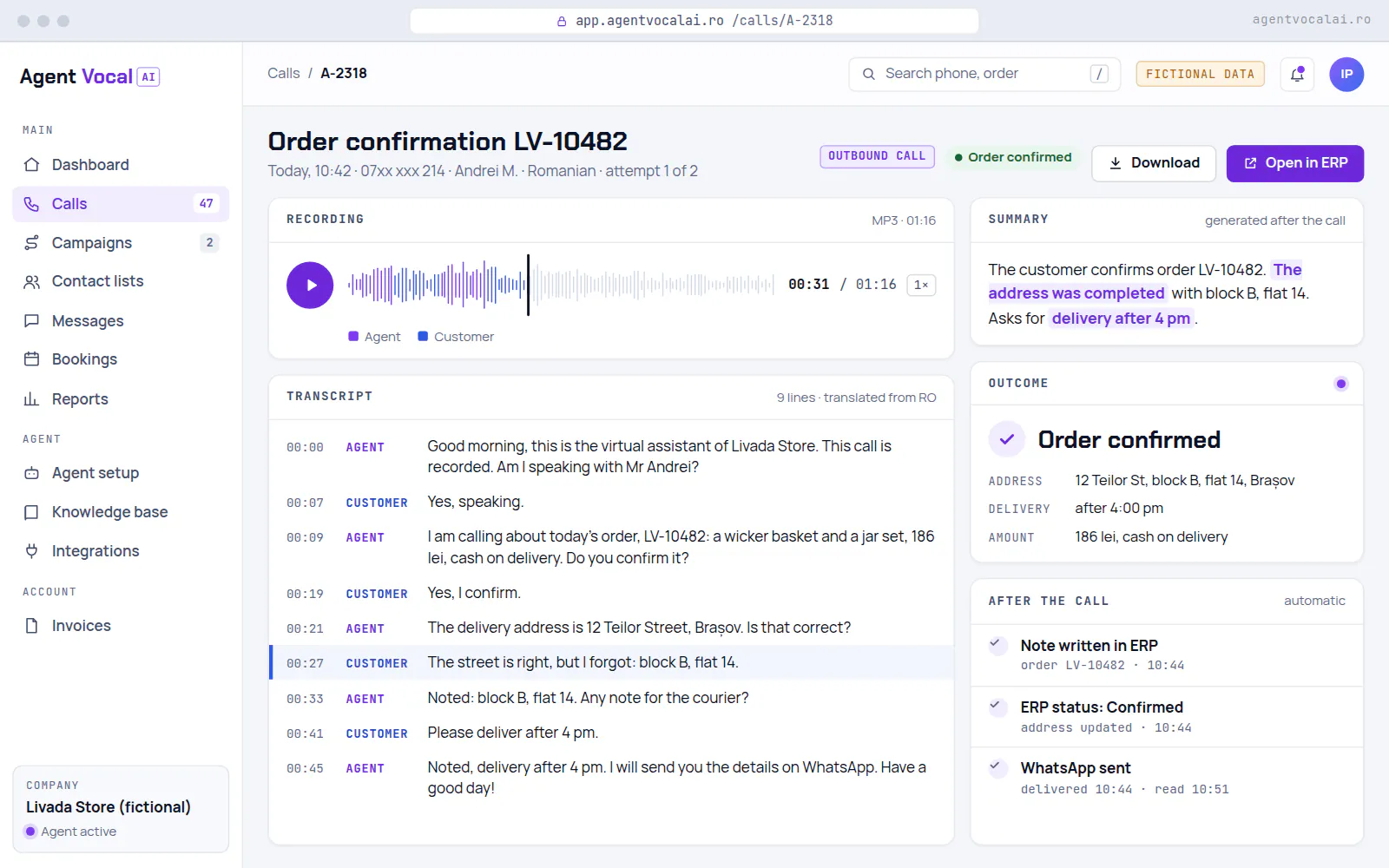
The agent calls a customer who ordered with cash on delivery. It introduces itself as a virtual assistant, says the call is recorded, and confirms the total and the address. When a passing tram drowns it out, the agent briefly repeats the question. The customer remembers they forgot the building number, and the agent notes it on the spot. At the end, a delivery note and an SMS with the details.
Clinic appointment
In the evening, after hours, someone calls with a toothache. The agent offers two free slots, notes the name, asks them to arrive ten minutes early and sends the confirmation on WhatsApp. Listen to how it points them to an emergency dentist if the pain gets worse, instead of giving medical advice.
Documents for a case file
A customer has to be told that two documents are missing. The agent reassures them from the start, says exactly what is missing, explains where to get the extract and what the IBAN is, then sends the list on WhatsApp and by email. If the documents do not arrive, it calls back on Thursday.
What every call leaves behind, taken apart
Every call has a record in the portal. Open it and you see everything: what was said, what the agent understood and what it did afterwards.
1Headerdirection, line, time and duration
2Recordinglisten to the whole call; the person was informed
3Transcriptwhat was said, word for word
AGENTHello, I’m the clinic’s virtual assistant, calling about tomorrow’s appointment. This call is recorded.
CLIENTYes, 10 o’clock still works.
4Summarytwo lines, so you don’t have to listen to it all
The customer confirms the appointment tomorrow at 10:00. No questions.
5Outcomea clear status, the same in reports
6Actionswhat it wrote and sent after the call
After the call, everything lands in the portal
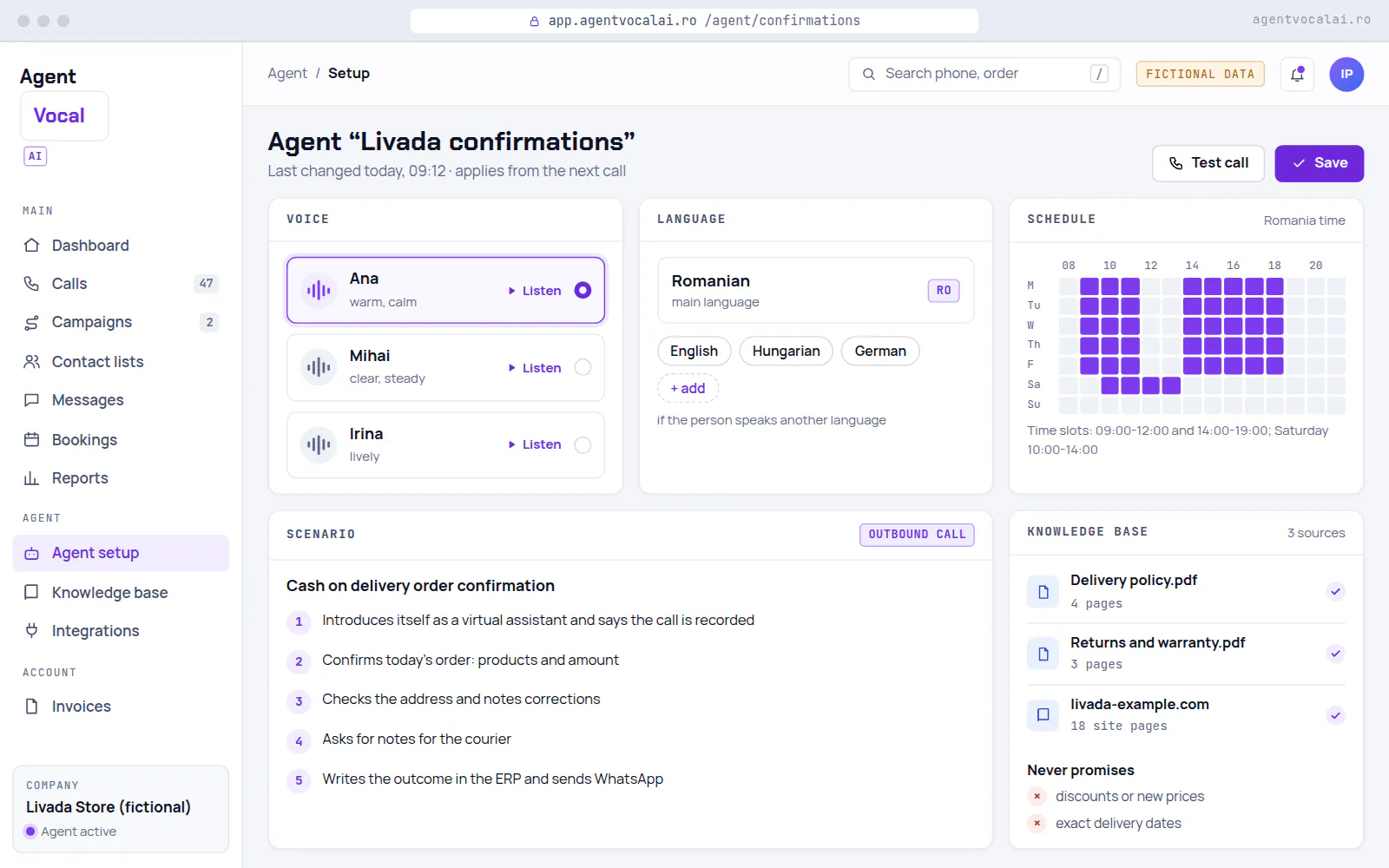
Every call like the ones above leaves a record with recording, transcript and outcome. And you tune the agent yourself: voice, language, schedule, scenario. Illustrative interface, fictional data.
What to look for as you listen
Do not just ask whether it "sounds human". What matters more is whether it gets the job done.
- Naturalness. Rhythm, politeness, pauses. You can hear it is a synthetic voice, but the conversation flows without awkward silences.
- Interruptions. What it does when the person talks over it or changes the subject, for example when the customer asks for an afternoon delivery.
- Confirming the details. It repeats the address, the amount, the time. A good agent checks what it understood before it writes anything down.
- The outcome. The call ticket under the player shows what the agent wrote afterwards: outcome, details and actions.
- Honesty. It introduces itself as a virtual assistant and says the call is recorded.
- Real customers or recordings of them
- Promised results or savings figures
- Sound that starts by itself
How to test it on your own number
The demos on this page are just a preview. The real test comes after sign-up, with your company's data.
The last step of the setup guide is the test call: the agent calls your own phone, with the scenario, voice and documents you chose. You play the customer: interrupt, change your mind, ask awkward questions. If you do not like something, you adjust the instructions and repeat the test. Only after that does the agent call anyone.
Want to see the steps first? Read how it works or go through a scenario close to your field.
From the form to the first call, on a single path
The only step our team does is the approval. You do the rest at your own pace, with a guide that walks you through it.
- 01 · you The form the cost estimate shows instantly
- 02 · us Approval a person checks, within 24 h
- 03 · you The 9-step guide you set it up, step by step
- 04 · the agent Live calls and answers for you
- Companydetails pulled from ANAF
- Industry and scenarioswhat you do, which calls
- Moduleswhat you switch on now
- Pricethe estimate for your volume
- ConnectionsCRM, ERP, WhatsApp, email
- Agent and voicehow it sounds, what it says
- Phone numberassigned automatically
- Lists and schedulewho it calls and when
- Test callyou hear it first
Quick answers
Frequently asked questions
Are these real calls with customers?
No. They are simulated calls, with fictional companies and people and synthetic voices. We do not publish recordings of our customers.
Can I hear a demo for my own field?
Yes, write to us at contact@agentvocalai.ro or on WhatsApp at +40 722 737 283 and we will prepare a demo for your scenario. Or sign up and make the test call yourself.
Why does the sound not start by itself?
Because we do not want to surprise you. Sound starts only when you press play, and you can also just read the transcript.
Continue with
Where to go next
How it works
From sign-up to your first test call and daily operation. See what the agent does on a call, how it retries and what you can check in the portal.
Call scenarios
See how an AgentVocal AI call scenario is built: goal, dialogue, rules, outcome and after-call message. Inbound and outbound calls, in Romanian and more.
Pricing
You pay per minute of talk time, plus a one-off setup per channel, with volume discounts. See your estimated cost in the sign-up form before you send anything.
The line is free
Hear it, then decide.
Sign up, see the estimated cost in the form and test the agent on your own phone before it calls anyone.