In this guide10 sections
- 01Why does a web hosting company lose calls, and what does it cost?
- 02What does an AI voice assistant handle in web hosting: the scenario map
- 03How does a website-down report sound with the voice agent?
- 04A day with the AI voice agent at a hosting company
- 05What do you gain from automating phone support?
- 06What stays with the support engineers, and what the agent avoids?
- 07What do you prepare before launch in web hosting?
- 08How do you start the voice agent in web hosting, step by step?
- 09Test an AI voice agent on your own hosting needs
- 10How much does an AI voice agent for web hosting cost?
An AI voice agent for web hosting is an AI voice assistant that answers the phone and calls customers in place of your support team, in English and many other languages. It takes the “my site is down” report, billing questions and domain requests, logs everything in the portal and sends a written confirmation after the call. In short, AgentVocal AI brings automation to a hosting company’s phone line: a voice assistant that never sleeps, never forgets a renewal and handles level one support, so people can focus on the hard incidents.
Below you will see which calls it takes, how you automate the repetitive part, how a real conversation sounds and what stays with people. The examples come from your trade: domains that expire unnoticed, servers that fall over at night and invoices that get forgotten.
Why does a web hosting company lose calls, and what does it cost?
A web hosting company lives through two moments when the phone rings at the worst time. The first: “my site is down”, at two in the morning, when nobody is at the desk, and the customer loses orders with every passing minute. The second is quieter: the domain or the plan that expires without anyone calling the customer in time, and the next day a site vanishes and the blame seems to be yours.
Between those, daytime support drowns in repetitive calls: “how much do I owe?”, “how do I transfer a domain?”, “why was my account suspended?”. Each one pulls an engineer off a real problem. An AI voice assistant does not solve everything, but it takes exactly the repetitive part and the after-hours moments, so the team can stay on the incidents that need a person.
What does an AI voice assistant handle in web hosting: the scenario map
In AgentVocal AI you group calls into two families: the incoming ones, which the agent takes, and the outbound ones, which it starts from a list. Below are all the scenarios you can switch on in the app. See also the page dedicated to web hosting.
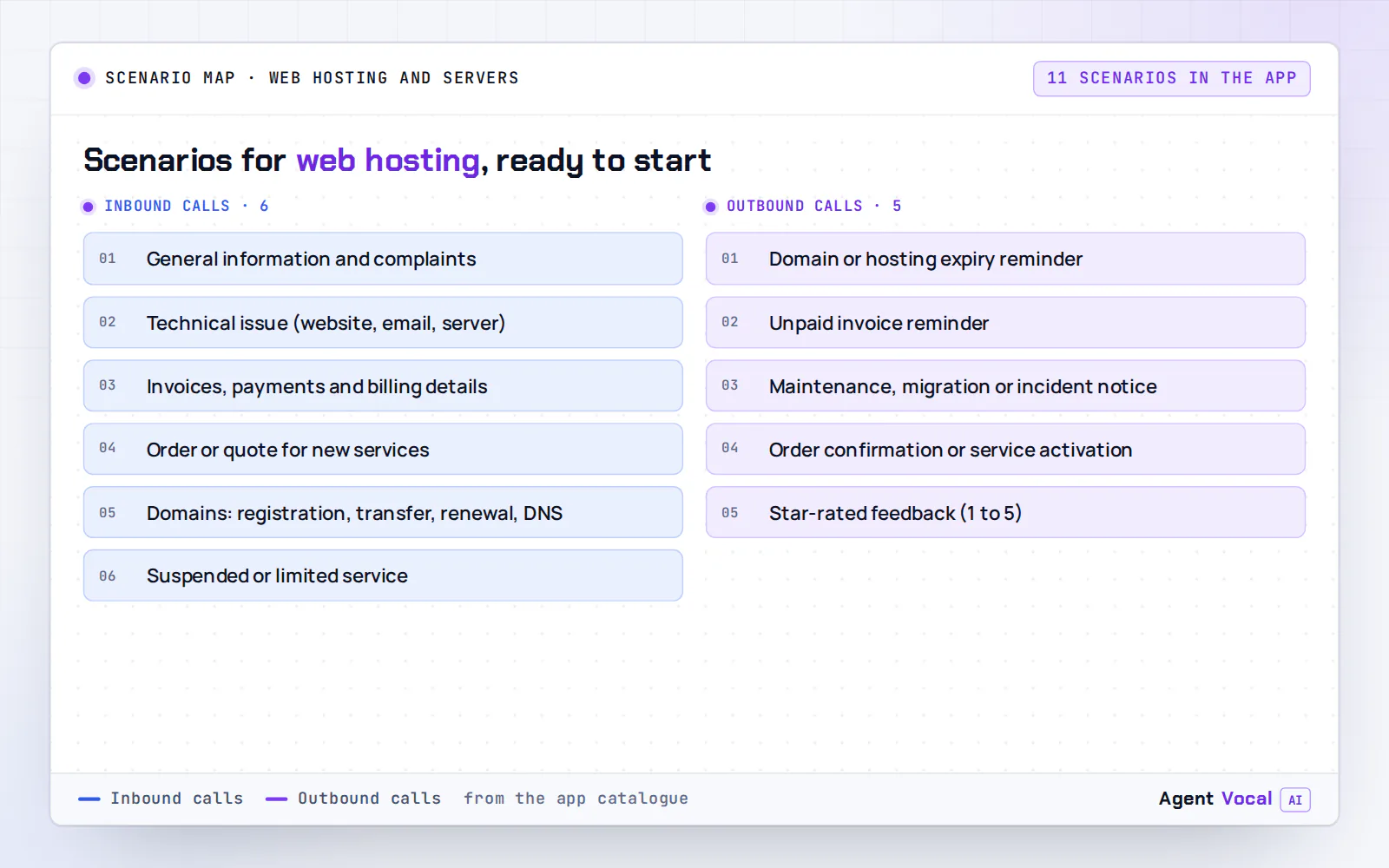
Incoming calls
- General information and complaints: the customer asks what the plans include, how to open a ticket, how to pay an invoice or how to transfer a domain. The agent answers from the knowledge base and logs complaints in full for the team.
- Technical issue (website, email, server): someone calls because the site is down, email does not work or they cannot log in to the control panel. The agent notes the full report, gives it a reference and sends it to the technical team with the right urgency. This is where the quiet nights are won.
- Invoices, payments and billing details: the customer wants to know what they owe, why they received an invoice or asks to change their details. The agent notes the request for the billing department, without improvising.
- Order or quote for new services: a customer or a prospect wants hosting, a server, a domain, an SSL certificate or a migration. The agent finds out what they need, says what exists in the knowledge base and hands the request to the sales team.
- Domains: registration, transfer, renewal, DNS: questions about a free domain, a transfer, an expiry or changing the name servers. The agent explains from the knowledge base and notes the request so a colleague can carry it forward.
- Suspended or limited service: the account was suspended for non-payment, resource overuse or an identity check. The agent neutrally explains the rule from the knowledge base and notes the reactivation request.
Outbound calls
- Domain or hosting expiry reminder: the agent calls the customer whose domain or plan expires soon, gives the date from the brief and notes whether they renew, cancel or want to be called again. This is where most silent losses stop.
- Unpaid invoice reminder: the agent politely reminds the customer that an invoice is overdue, neutrally states the suspension rule and notes whether they have paid or when they will.
- Maintenance, migration or incident notice: the agent announces scheduled work, a server migration or an incident that affects the customer, checks they understood and notes their questions for the team.
- Order confirmation or service activation: the agent calls the customer who placed a new hosting, server or domain order, confirms the details, finds out whether anything else is needed for activation and notes the answer.
- Star-rated feedback (1 to 5): after a period of support, the agent asks seven short questions, each rated from one to five stars, and notes the comments. You learn what customers think of your hosting and your support, without forms that nobody fills in.
How does a website-down report sound with the voice agent?
Here is an incoming call at a fictional hosting company, HostLine, late one evening.
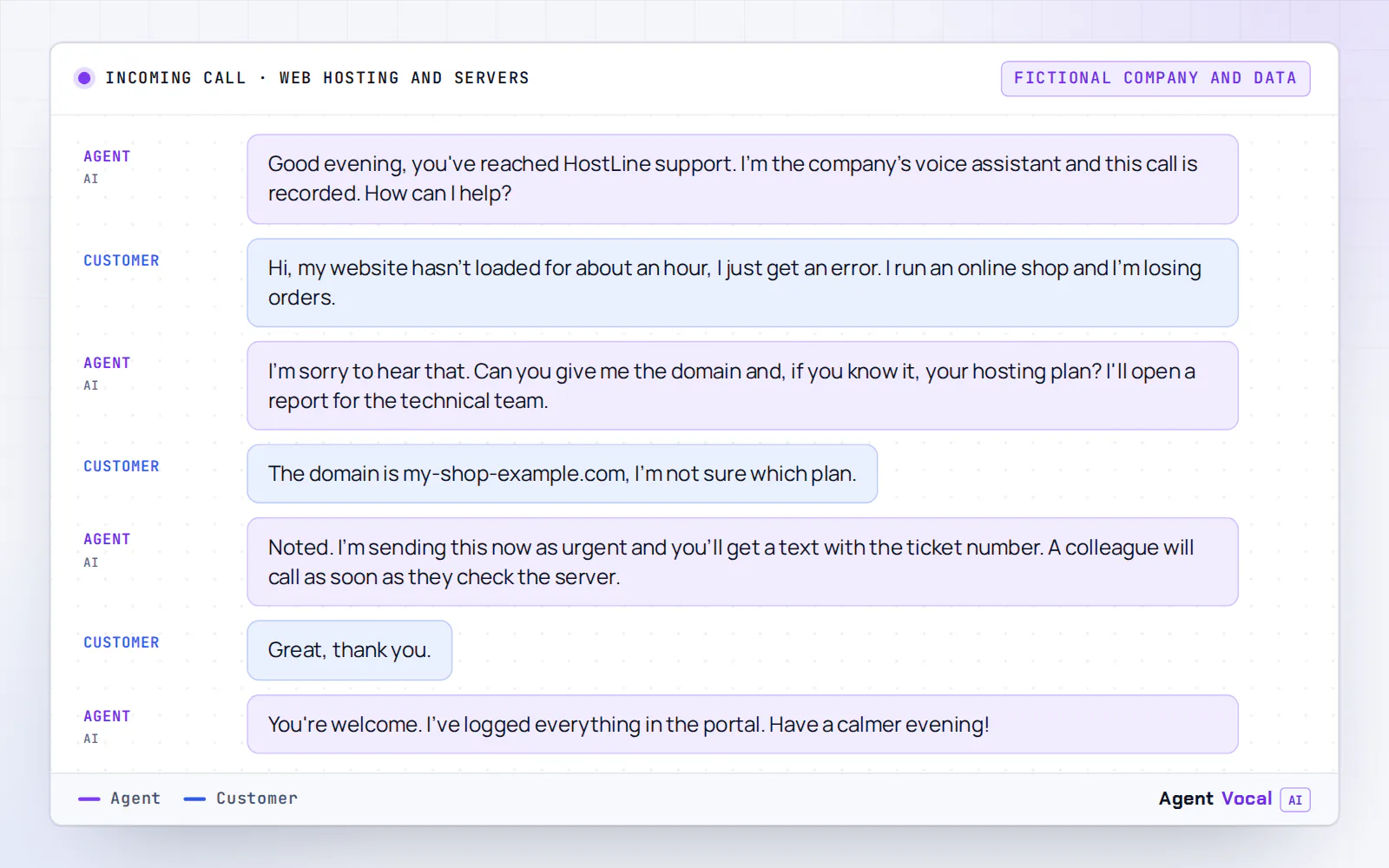
Notice what the AI voice assistant did, step by step: it introduced itself as a virtual assistant and said from the first line that the call is recorded; it listened to the problem without making the customer repeat it three times; it confirmed the domain by repeating it; it opened a technical report marked urgent and sent the ticket number by SMS. After the call, the portal holds the recording, the transcript and a summary, and a colleague picks up the case with full context. The agent did not promise to repair the server itself: it carried the information to a person, fast. If you want to hear how it sounds, listen to a demo.
A day with the AI voice agent at a hosting company
At HostLine, a small web hosting company, a day with an AI voice agent looks roughly like this.
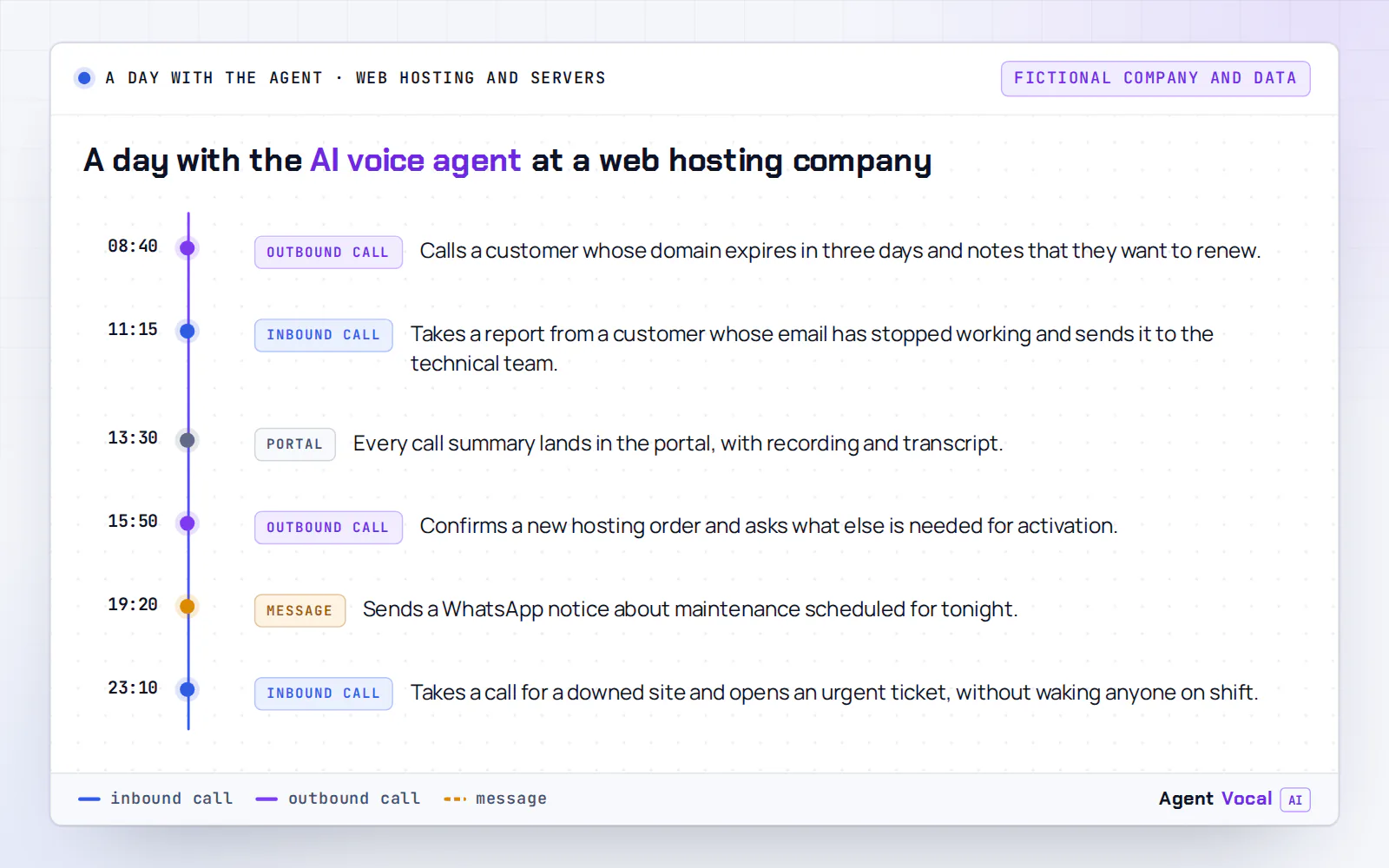
Before anyone reached the desk in the morning, the agent had already called a customer whose domain was expiring and noted that they wanted to renew. Through the day it took the routine reports and billing requests, confirmed a new order and sent a WhatsApp notice about an overnight maintenance window. Late in the evening, when the office phone would have rung into the void, a customer reported a downed site; the agent opened the urgent ticket, and the on-call engineer received everything already written down. The next morning nobody started by asking “who called last night”: every call summary was already in the portal, with recording and transcript.
What do you gain from automating phone support?
The benefits do not come from magic, but from the mechanism:
- No missed call: the agent answers from the first ring, including nights and weekends, exactly when most sites go down.
- Renewals on time: automating the reminder calls stops the quiet loss of expired domains and plans.
- Colleagues freed from level one: repetitive questions no longer interrupt an engineer in the middle of a real incident.
- Tickets written for you: every call leaves a recording, a transcript and a summary in the AgentVocal AI portal, and the customer gets the ticket number by WhatsApp, SMS or email, with no one transcribing anything.
- Speaks the customer’s language: the 84 languages available help if you host customers from abroad on a server or a domain.
- Answers at once: the agent picks up in less than a second, with no hold music left playing to a customer whose site is down.
You gain the most not from the call you answer, but from the one you place in time: a domain renewed before it expires is worth more than ten explanations about DNS.
Put it all together and the picture is clear: an AI voice agent does not replace your engineers, it buys them time. At night it keeps the line open for downed sites, by day it filters the routine billing and domain questions, and in the background it calls customers whose renewals are about to lapse. Your technical team reaches the desk with a clean list of real incidents, not a stream of repetitive calls. For a small hosting company, where the same people do support, sales and administration, this automation is the difference between constant firefighting and a calm, orderly day. See how the round-the-clock call answering works and how messages go out in the follow-up after a call scenario.
What stays with the support engineers, and what the agent avoids?
A good voice assistant knows its limits, and this one’s are clear:
- It does not rebuild the server or touch the control panel: it opens the report and takes it to the technical team.
- It does not invent the cause of an incident and does not promise a resolution time it does not have.
- It does not improvise or negotiate invoices: it notes the request for billing.
- It does not reveal sensitive data without the checks you set; you can read about that on the security page.
- It does not pretend to be human: it introduces itself as a virtual assistant and announces the recording.
- It honours “do not call me again” and the time ranges you set.
Big incidents, commercial decisions and angry customers stay with people; the AI voice agent only prepares the ground, with the information gathered correctly.
What do you prepare before launch in web hosting?
An agent that does level one support needs the same information you would give a new helpdesk colleague. In AgentVocal AI you prepare:
- the documents and answers: plans, level one support steps, renewal, transfer and suspension rules;
- the calendar: the time ranges for booking an intervention or a call with a colleague;
- the contact lists for outbound calls: who has an expiring domain, who has an overdue invoice;
- the connections: CRM, the ticketing system, ERP, calendar and WhatsApp, which you link from integrations;
- the time ranges in which the agent may call.
The guide on how to prepare the knowledge base walks you through it point by point.
How do you start the voice agent in web hosting, step by step?
Starting an AI voice assistant is simpler than it looks, because it is self-service: you do it yourself in the platform, and the team only approves your account, within 24 hours at most. If you first want the big picture, see how an AI voice agent works.
- You register in AgentVocal AI through the form with the cost estimate.
- You go through the nine-step wizard: company, industry and scenarios, modules, price, connections, agent and voice, a phone number assigned automatically, lists and schedule, test call. In a real test, the technical configuration took 4 minutes and 38 seconds.
- You start with a single scenario, for example the after-hours reports or the expiry reminders.
- You make a test call from your own phone.
- You expand gradually, as your confidence grows.
For a full check before go-live, use the launch checklist.
Test an AI voice agent on your own hosting needs
The simplest way to see whether it fits is to create an account and try it on your own cases, not on a generic demo. You create an account in a few minutes at Create your account, see the estimated cost right in the form, choose the web hosting industry and tick the scenarios you need, from the after-hours technical reports to the domain expiry reminders.
Once your account is approved you get the nine-step wizard and configure the agent yourself. Then you make the first test call straight from your own phone: report a downed site, ask for a renewal, check what the portal records, all before the agent calls a single real customer. That way you see exactly how an AI voice assistant sounds on your own flow, with no promises and no risk.
How much does an AI voice agent for web hosting cost?
You pay per minute of conversation, rounded up per call, plus a one-time setup per channel. The only calls that are not charged are the ones nobody answers; voicemail is billed as a normal minute. You are not paying a fixed salary for a colleague who sits idle at night: you pay for the conversations that actually happen, and automating the reminders pays for itself quickly in saved renewals. The full model, with every threshold, is on the pricing page, and the way it is calculated is explained in the AI voice agent cost guide.