In this guide10 sections
- 01Why do case files stall, and what does the delay cost?
- 02What an AI voice assistant handles in claims recovery: the scenario map
- 03How does a call for a missing document sound with the voice agent?
- 04A day with the AI voice agent at a claims recovery firm
- 05What do you gain from automating collection calls?
- 06What stays with the consultants, and what the agent never does?
- 07What do you prepare before calling the first list of files?
- 08How do you start the agent on your case files, step by step?
- 09Test an AI voice agent on your own case files
- 10How much does an AI voice agent for claims recovery cost?
An AI voice agent for claims recovery is an AI voice assistant that calls customers and answers the phone for compensation and receivable files: delayed flights, car damage, insurance claims. It asks for the missing documents, explains the signing steps, states the general status of the file and books calls with consultants, without promising amounts. In short, AgentVocal AI brings automation to the tiring part of the work, and a patient voice assistant unblocks the files that stalled over a single document. This voice agent is the colleague who never loses patience on the third call for the same paper.
Below you will see which calls it takes, how you automate the document chasing, how a real conversation sounds and what stays with the consultants. The examples come from your trade: files blocked over a copy of an ID and customers who never answer email.
Why do case files stall, and what does the delay cost?
A claims recovery firm lives off files that move forward. The trouble is that most of them stop in the same place: a document is missing, a signature on the assignment, a confirmation. The file is otherwise fine, but it sits for weeks because nobody caught the customer on the phone to ask for exactly the thing that is missing.
The classic method, email, does not work: people do not open it, forget it or cannot tell from the text what to send. The result is a mountain of half-complete files and a consultant who loses hours calling the same people one by one. An AI voice assistant takes exactly this patient, repetitive work: it calls, explains simply, notes and sends the steps in writing, so the file starts moving again.
What an AI voice assistant handles in claims recovery: the scenario map
In AgentVocal AI you split calls into incoming ones, which the agent takes, and outbound ones, which it starts from a list of files and a brief. Below are all the scenarios you can switch on in the app. See also the page dedicated to claims recovery.
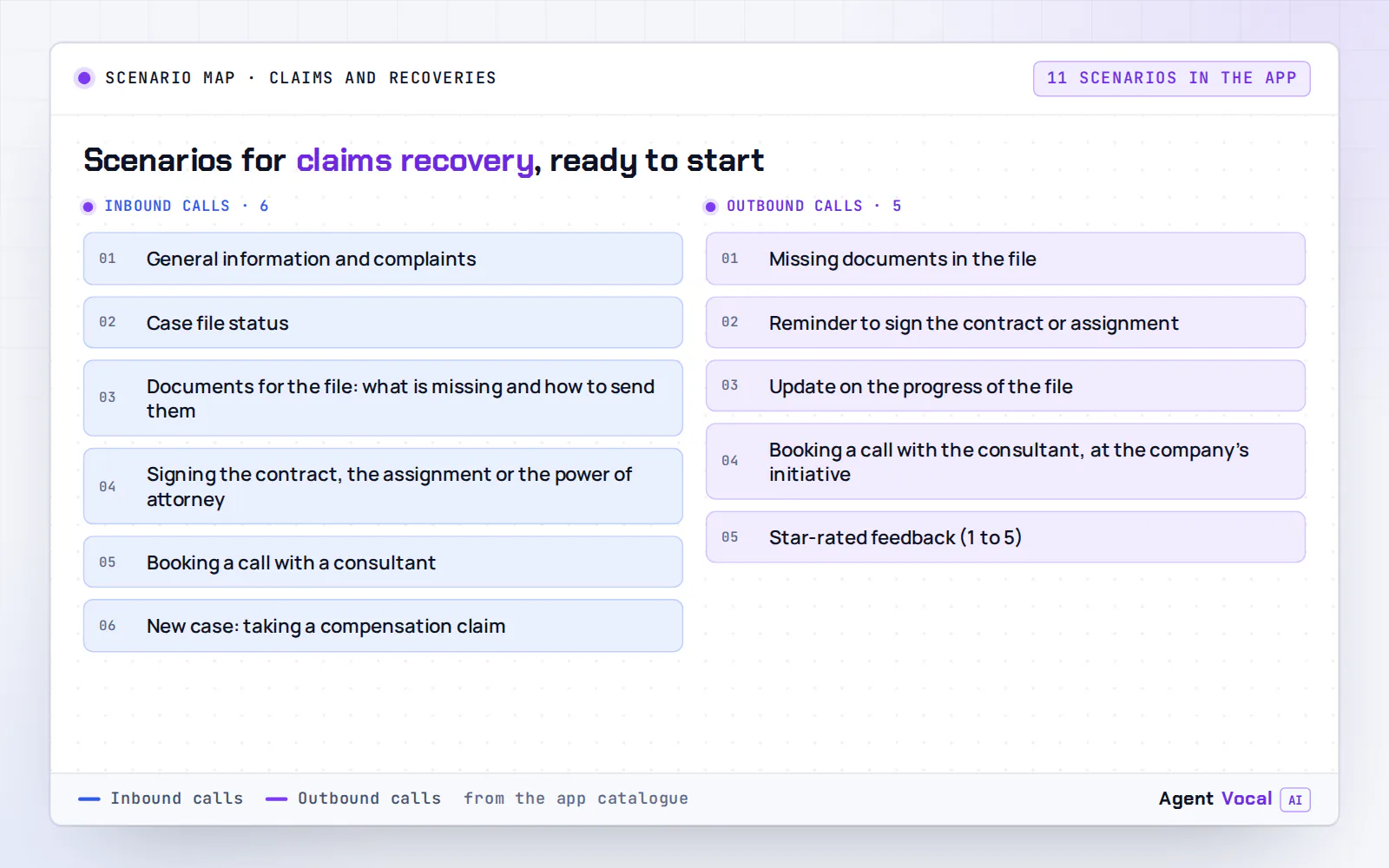
Incoming calls
- General information and complaints: the customer asks which types of cases the firm takes, how a file is opened, which documents are needed or how the commission works. The agent answers from the knowledge base and logs complaints in full for the team.
- Case file status: the customer wants to know how far their file has got. The agent identifies them by file number, explains the general stages from the knowledge base, does not guess the actual stage and notes exactly what they want to know, so a consultant can come back.
- Documents for the file: what is missing and how to send them: the customer asks which documents are still needed, or says they have sent them. The agent explains the list and the channels from the knowledge base, in simple words, and notes what the customer sent and where, without validating the documents.
- Signing the contract, the assignment or the power of attorney: the customer asks how to sign or what the document they received means. The agent explains the steps from the knowledge base, does not interpret clauses and notes the answer.
- Booking a call with a consultant: the customer wants to discuss the file, the contract or a special situation with the consultant. The agent notes the subject and books a free slot in the calendar for a call back.
- New case: taking a compensation claim: a person calls with a new case, a delayed flight, car damage, an insurance file. The agent notes the basic case and contact details, says from the knowledge base which cases the firm takes and how it continues, without assessing the case or promising amounts.
Outbound calls
- Missing documents in the file: the agent calls the customer whose file is blocked, explains simply what is missing from the brief, says where and how to send it and notes the answer: will send by when, already sent, no longer has the document or does not know how. This is where most files get unblocked.
- Reminder to sign the contract or assignment: the agent calls the customer who received the contract, the assignment or the power of attorney and has not signed, reminds them of the steps from the brief and notes the answer: will sign, already signed, has questions or gives up.
- Update on the progress of the file: the agent passes on news from the brief, the file was filed, an answer came, a stage is next, and what the customer has to do, if anything; it notes their questions for the consultant, without adding anything.
- Booking a call with the consultant, at the company’s initiative: the agent calls the customer whose file needs a discussion, for the reason in the brief, and books a free slot from the calendar; if they do not want one, it notes the preference.
- Star-rated feedback (1 to 5): after the file is closed, the agent asks seven short questions, each rated from one to five stars, and notes the comments about the communication with the team.
How does a call for a missing document sound with the voice agent?
Here is an outbound call from a fictional claims recovery firm, ClaimPath, to a customer whose file is blocked over a document.
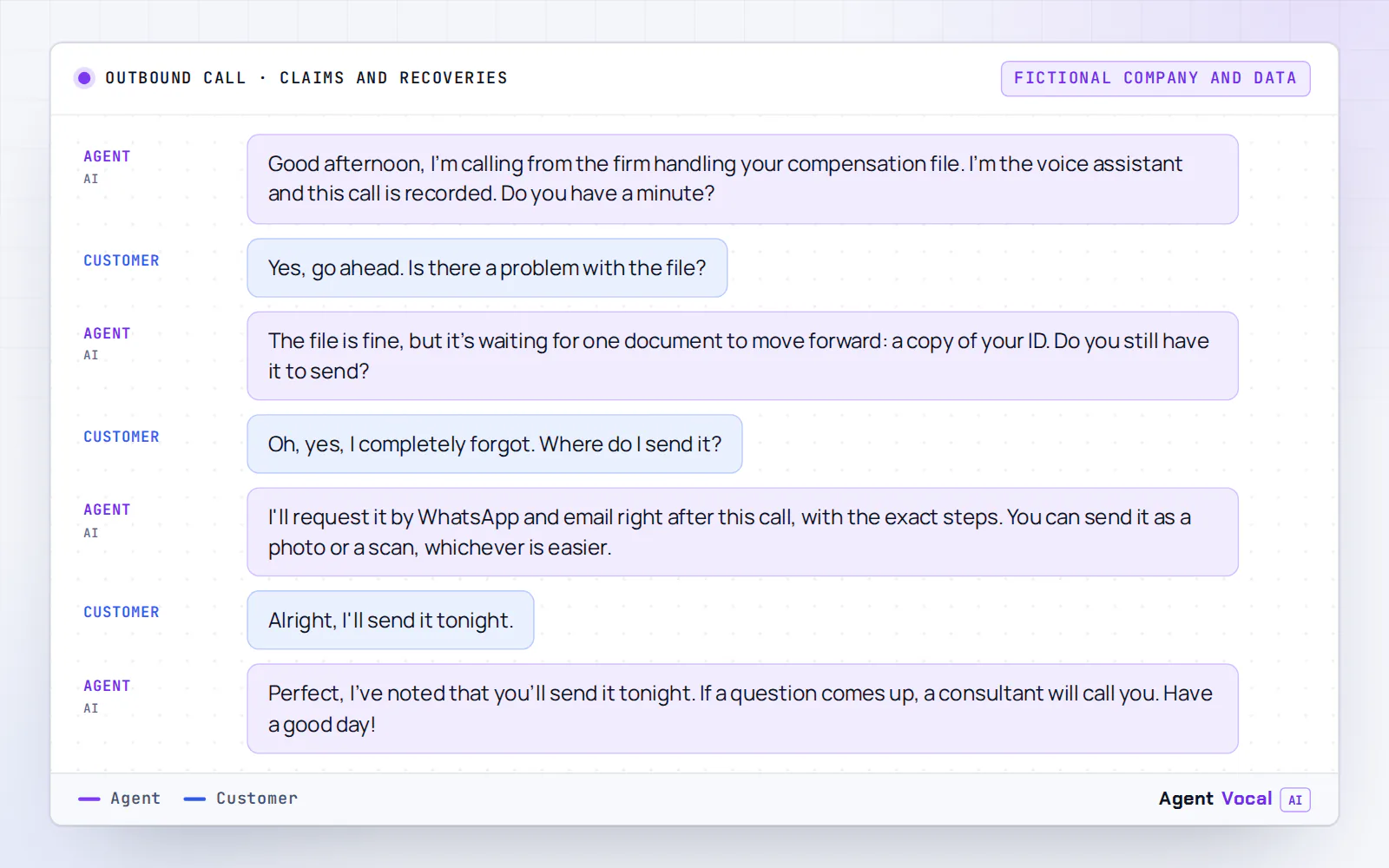
Notice what the AI voice assistant did: it introduced itself and announced the recording; it reassured the customer that the file is fine, it is only waiting for a document; it named the exact missing document, instead of a vague “we need some papers”; it sent the same steps by WhatsApp and email, so the person has them in writing; and it noted when the customer promised to send it. It interpreted nothing and promised no amount. If you want to hear the tone, listen to a demo, and the full flow is in the missing documents recovery scenario.
A day with the AI voice agent at a claims recovery firm
For an AI voice agent put on case files, the day means lists to call and calls to take, all around the same missing papers.
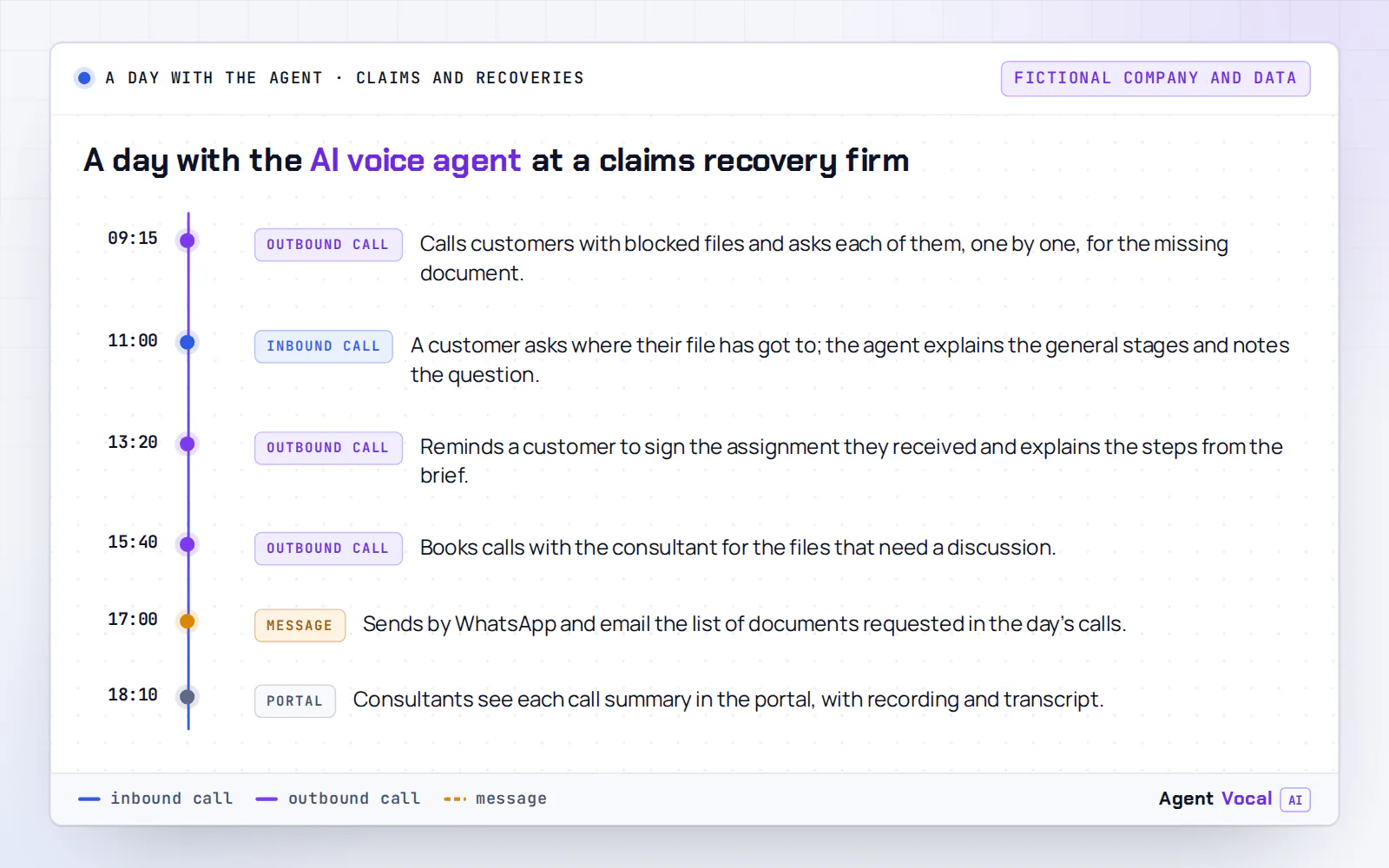
In the morning it called the customers with blocked files and asked each one, in turn, for the document that is missing, then sent them the steps in writing. At midday it took the questions from people who wanted to know where their file had got to and noted each request for a consultant. In the afternoon it reminded a few customers to sign the assignment and booked consultant calls for the files that needed a discussion. In the evening, the consultants found each call summary in the portal, with recording and transcript, and a clear list of files that had started moving again. Nobody called the same person ten times.
What do you gain from automating collection calls?
The gain comes from the mechanism, explained simply:
- Unblocked files: automating the calls for the missing papers sets moving again the files that were sitting idle.
- Customers reached, not lost: those who ignore email often answer the phone, and the agent then sends the steps in writing.
- Consultants on the real work: people are freed from repetitive dialling and stay on negotiation, strategy and special cases.
- A full history per file: every call stays in the AgentVocal AI portal with recording, transcript and summary, and the customer gets the steps by WhatsApp, SMS or email, so the consultant picks up the case with everything that was said, not from scratch.
- Customers from anywhere: the 84 languages available help with compensation files from abroad, such as delayed flights with passengers from several countries.
- A calm tone, file after file: the agent answers in less than a second and does not lose patience even on the third call for the same document.
A file is not lost for a big reason, but over an ID copy that was never sent. An AI voice agent that calls in time for exactly that paper makes the difference between a blocked file and one that moves forward.
For a claims recovery firm, a file sitting idle is lost time for the customer and one more source of frustration. An AI voice agent that calls systematically for every missing document turns a pile of half-complete files into a flow that moves, so the people in the firm stop losing the day on “did you send the ID?” and work on what needs legal preparation. And the customer feels that someone is handling their file, even if the first contact was a voice assistant.
What stays with the consultants, and what the agent never does?
A fair voice assistant knows its limits, especially in a sensitive field:
- It does not assess the case and does not promise amounts or results.
- It does not interpret clauses in the contract, the assignment or the power of attorney: it explains the general steps and notes the questions.
- It does not validate the documents received: it notes what the customer sent and where, and a person does the checking.
- It does not guess the actual stage of a file: it states the general stages and leaves the consultant to come back.
- It does not pretend to be human: it introduces itself as a virtual assistant and announces the recording. You can read how we treat data on the security page.
- It honours “do not call me again” and the time ranges.
Legal decisions, negotiation and delicate cases stay with the consultants. The AI voice agent brings them complete files and prepared customers.
What do you prepare before calling the first list of files?
An AI voice assistant is only as good as the brief is clear. In AgentVocal AI you prepare:
- the knowledge base: the case types, the list of documents, the sending channels and the general stages, in simple words;
- the brief per file: for each customer, which document is missing or which signing step is next;
- the contact lists for outbound calls, with the blocked or unsigned files;
- the connections: CRM, calendar and message channels, which you link from integrations;
- the time ranges and the retry cadence for those who do not answer the first time.
The guide on how to prepare the knowledge base walks you through it point by point, and the follow-up after the call is in the follow-up after a call scenario.
How do you start the agent on your case files, step by step?
You do not depend on a long technical project to start: you configure the agent yourself in the platform, and we only approve the account, within 24 hours at most. If you first want the mechanism, see how an AI voice agent works.
- You register in AgentVocal AI through the form with the cost estimate.
- You go through the nine-step wizard: company, industry and scenarios, modules, price, connections, agent and voice, a phone number assigned automatically, lists and schedule, test call. In a real test, the technical configuration took 4 minutes and 38 seconds.
- You start with a single scenario, for example asking for the missing documents on a small list of files.
- You make a test call from your own phone.
- You expand gradually, as your confidence in the results grows.
Test an AI voice agent on your own case files
You see the value best on your own files, not on a general example. You create an account in a few minutes at Create your account, see the estimated cost in the form, choose the claims recovery industry and tick your own scenarios, from asking for the missing documents to reminding people to sign the assignment.
Once your account is approved you get the nine-step wizard and configure the agent yourself. Then you make the first test call straight from your own phone: ask for the status of a sample file, ask which documents are missing and see what the agent records in the portal, before it calls a single real customer. That way you find out how an AI voice assistant sounds on your own files, with no promises and no risk.
How much does an AI voice agent for claims recovery cost?
You pay per minute of conversation, rounded up per call, plus a one-time setup per channel. The only calls that are not charged are the ones nobody answers; voicemail is billed as a normal minute. In practice, you pay for the calls that actually unblock files, not for the hours a consultant would have spent dialling into the void. In short, automating the collection calls pays for itself quickly in files set moving again. The full model, with every threshold, is on the pricing page.